Reference
Bot Builder Reference
Complete documentation for every block, rule, and concept in the Argix Labs bot builder. 72 blocks across 12 categories.
This documentation describes what each block does — not whether it will be profitable. All indicators are backward-looking. Trading involves risk of loss.
Overview
Core concepts behind the Argix Labs bot builder.
The bot builder is a visual tool for assembling trading strategies from modular blocks. It does not generate strategies for you — you decide the logic, the parameters, and the risk limits. The builder organizes your decisions into a graph that can be validated, backtested, and deployed to a broker. Understanding the execution model and block categories is essential before building.
Structural Blocks
Organize and allocate capital across branches of your bot.
Structural blocks do not contain trading logic themselves. They define how your strategy is organized, how capital is split between sub-strategies, and which assets each branch targets. A simple bot may not need any structural blocks beyond the root. Multi-asset or multi-strategy bots use Groups, Weights, and Asset blocks to manage complexity.
Flow Control
Conditional logic and branching blocks.
Flow-control nodes introduce conditional routing within the strategy graph: distinct subgraphs may be activated according to indicator predicates, temporal constraints, or user-defined expressions. They increase topological complexity; inclusion should be motivated by explicit branching requirements in the strategy specification.
Function Blocks
Single indicators you compare against a value — the smallest pieces a strategy is built from, and the ones the palette lists first.
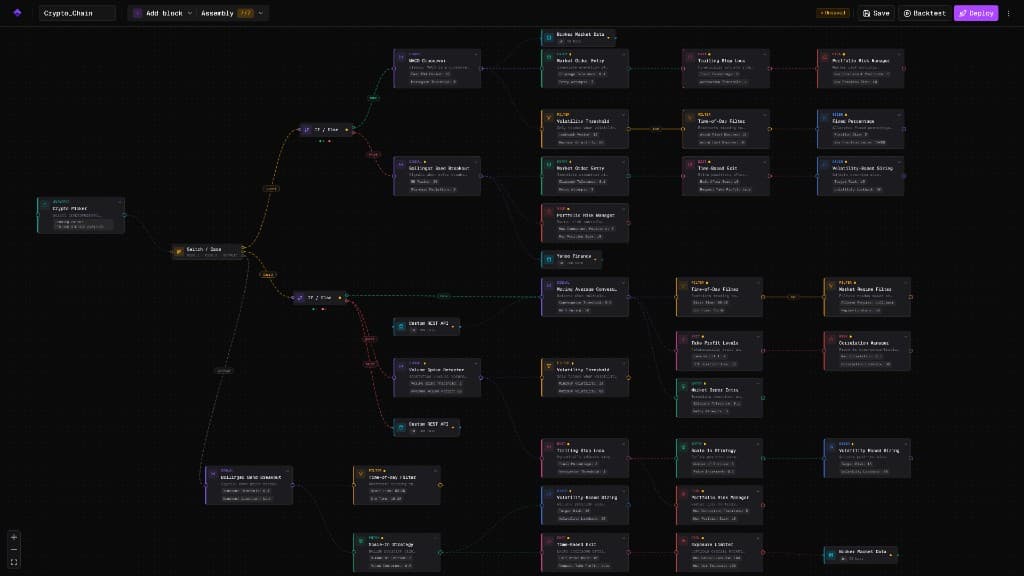
A function block is one indicator plus one comparison: RSI below 30, price above its 200-day average, volume at twice its usual. That is the whole block. You pick the indicator, the period and the level, and it becomes a condition the engine evaluates on every bar. They are the palette's PRIMARY blocks, listed above the pre-built components, because almost any strategy can be assembled from them. Where a pre-built component shares a name with a function block — MACD Crossover exists as both — the function block is the one the palette offers first; the pre-built version bundles several settings into one card, while the function block leaves the comparison open for you to change. Each one drops into a slot decided by its category: a signal proposes an entry, a filter gates one, an exit closes a position. The category is fixed per block and listed on each card below. When you need something none of these express, the Custom Code blocks let you write it.
Signals
Signal blocks express conditions the graph can react to. In many bots several signals feed the same branch with OR logic—whichever fires first can advance the pipeline.
In typical graph layouts, signal nodes appear upstream: they assert when an indicator condition—computed from historical price and volume—is satisfied. That assertion is a structural predicate within the execution model, not a forecast of return. Downstream nodes commonly apply filters, sizing, and risk constraints; this reference specifies measurement semantics and composition rules only, without recommending a particular trading style.
Filters
Filter blocks narrow when a branch may continue. On a path where several filters apply, AND logic means each one must pass before the graph advances.
Filters are applied downstream of signals: they cannot originate an entry condition; they only permit or deny transitions for predicates that have already evaluated true. A passing filter is a Boolean constraint, not a performance metric. Production graphs vary from dense gating (session, liquidity, volatility) to minimal structure; this section documents mechanics and failure modes only, without prescribing portfolio policy.
Entry & Exit
Entry blocks describe how an order is expressed when the graph reaches that step. Exit blocks describe how a flat is requested. Validator rules in Argix Labs expect one entry and at least one exit on deployable graphs; several exits behave as OR—first condition hit wins in the model.
Market orders prioritize time priority in the matching engine at the expense of price certainty; limit orders impose a price bound with nonzero non-fill probability. Stop-loss, take-profit, and hybrid exit nodes are frequently composed so that the first satisfied condition initiates closure; trailing stops ratchet protective stops with favorable drift. Executed prices remain subject to gap risk, partial fills, and venue-specific behavior independent of configured parameters.
Sizers & Risk
Position sizers determine how much capital each trade uses. Risk blocks enforce safety limits that cannot be disabled.
Position sizing controls how much of your account is allocated to each trade. Risk management blocks define hard limits on drawdown, daily loss, and exposure. The Risk block is always required and cannot be removed from any bot. No sizing method or risk limit can prevent all losses — they are tools for managing exposure, not guarantees against loss.
AI & Data Blocks
Where a bot gets information that is not price: the market-data feed itself, an LLM gate on entries, and a value pulled from an HTTPS endpoint.
The Data Source block decides which provider supplies bars and quotes, and every other block on the canvas reads what it produces. AI Decision and API Request are both live: the first is a FILTER that can veto an entry other blocks proposed and never initiates one itself, the second fetches a named numeric value that conditions elsewhere reference. Math Expression is visible in the palette but not yet addable. Every external path adds latency, rate limits and an availability risk the rest of the bot does not have — a block that cannot read its input fails closed and blocks the trade rather than guessing.
Math Expression
MaintenanceEvaluates a custom mathematical expression on available data. Compute custom indicators, ratios, or composite scores that are not available as built-in blocks.
Custom Code
Two blocks that run a small language you write yourself: a true/false condition, and a named series other blocks can read.
Use these when the indicator you want is not in the palette. The language is deliberately small: arithmetic, comparisons, and/or/not, if/then/else, named values, `var` with `:=` for a value that carries across bars, `x[1]` to look back, your own `fn` definitions, the 32 built-in indicators, and the price series close/open/high/low/volume/hl2/hlc3/ohlc4. It has NO loops, NO recursion, NO strings and NO collections, and that is the point rather than an omission: without them every bar does a fixed, known amount of work, so a block cannot hang the bot that runs it. There is ONE interpreter. The live preview in the editor runs exactly the code the engine runs against exactly the same bars, so the number shown while you write cannot disagree with the number your bot acts on. Writing block code is a Pro feature; reading a block, and being told why one failed, stays available on every plan.
Validation
Continuous structural verification of the strategy graph prior to simulation and deployment.
Validation executes incrementally as the graph is edited. It enumerates missing structural elements required by the current execution contract; it does not assess economic merit. Severities marked as blocking prevent deployment under present product rules; non-blocking notices indicate configurations that remain executable but may be inconsistent with implicit single-active-node assumptions (e.g. multiple entry nodes with one effective path). Neither category constitutes performance evaluation.
Best Practices
Practical guidance for building and testing strategies.
These are not guarantees of success — they are patterns observed by practitioners that tend to reduce common mistakes. Trading involves risk. No strategy, no matter how carefully constructed, is certain to be profitable. The following guidelines are intended to help you avoid well-known pitfalls.